Agentic AI 完全解析:從架構原理到企業實作的技術指南
開場
假設你的企業剛導入了一套 AI 客服聊天機器人。系統運作順暢,能夠回答常見問題。但當客戶問「請幫我查詢訂單狀態並調整配送地址」時,AI 回答完畢後,客服代理人仍需手動登入 CRM、查詢訂單系統、確認庫存系統、溝通配送業者——整個過程跨越 5 個系統,耗時 20 分鐘。這就是傳統 AI 與 Agentic AI 的根本差異:前者告訴你答案,後者替你執行整個流程。
一、什麼是 Agentic AI?為什麼現在才成熟?
定義與核心特徵
Agentic AI(能動式 AI / AI Agent)是一類能夠自主規劃、執行、報告並自我優化的 AI 系統。與被動式生成 AI 不同,Agentic AI 具備以下特徵:
- 自主規劃能力 — 將複雜目標分解成多個子任務,制定執行計畫
- 工具使用能力 — 主動呼叫 API、資料庫、檔案系統等外部工具完成任務
- 動態決策能力 — 根據執行結果即時調整策略,而非預設流程
- 自我修正能力 — 遇到失敗能夠診斷根因、嘗試替代方案
- 自動報告能力 — 完成任務後生成結構化結果與決策理由
用簡單比喻:如果生成 AI(如 ChatGPT)是「會寫報告的顧問」,Agentic AI 就是「會寫報告、還會執行計畫、並根據結果調整策略的行動型經理」。
為什麼 2024-2026 是 Agentic AI 的成熟期
三大技術突破造就了這個轉折點:
1. 推理能力的質變 — ReAct 與 Chain-of-Thought
2022 年 Google Brain 的 CoT(Chain-of-Thought)論文(Wei et al., NeurIPS 2022)證明了 LLM 可以「先推理再行動」。隨後 ReAct(Reasoning + Acting)框架進一步整合了推理與工具調用。今日的 Claude、GPT-4o 等模型原生支援多輪推理,能夠在推理過程中動態決定何時調用工具——這是 Agentic AI 實現的必要條件。
技術里程碑:
- 2022 年末:ReAct 框架提出(Yao et al., ICLR 2023 收錄),模型開始支援「思考 → 行動 → 觀察 → 再思考」迴圈
- 2024 年秋:o1 模型(9 月 preview)引入強化推理;o3 於 2024 年底公告、2025 年正式推出,複雜推理能力大幅提升
- 2025-2026 年:主流商用模型皆內建 thinking tokens 與動態工具選擇機制
2. 成本結構的反轉 — 更便宜的推理 + 大上下文窗口
- 推理成本下降:根據公開定價資料,GPT-4 的推理成本自 2023 年推出以來已下降逾 80-90%;同世代的 Claude Haiku 成本約為 Opus 的 1/5
- 上下文窗口爆炸:從 2022 年的 4K tokens(ChatGPT 初代 GPT-3.5)擴展到今日的 128K-1M tokens(GPT-4 Turbo 128K、Claude 3.5 200K、Gemini 1.5 1M)
- 快取機制普及:Prompt caching 可減少 40-60% 的重複推理成本
結果:企業級 Agentic AI 部署成本已從「數百萬年度」降至「數十萬年度」。
3. 工具生態的成熟 — 標準化 Agent 框架
開源生態完備:
- LangChain — 提供統一的工具註冊、鏈式編排、記憶管理
- AutoGen — Microsoft 的多代理協作框架,支援高度靈活的代理群體協作(v0.4+ 採用事件驅動架構)
- CrewAI — 面向企業的角色扮演式多代理平台
- Claude Agent SDK — Anthropic 原生的 Agent 框架,整合工具編排、記憶、可觀測性
這些框架的出現,讓企業不必從零開始實現 Agent 核心引擎,大幅降低進入門檻。
與其他 AI 系統的區別
| 維度 | 傳統 AI 自動化(RPA) | 生成式 AI(ChatGPT) | Agentic AI |
|---|---|---|---|
| 執行方式 | 預定義規則流程 | 根據提示生成輸出 | 自主規劃與動態調整 |
| 適應能力 | 低(規則改變需編碼) | 中(單次提示可靈活) | 高(多輪推理+工具選擇) |
| 外部系統整合 | 深度集成但硬編碼 | 無法主動整合 | 動態呼叫 API/工具 |
| 決策自主性 | 無(只能執行) | 無(只能建議) | 有(可自主決策執行) |
| 錯誤恢復 | 失敗停止 | 無法恢復 | 可診斷與自動重試 |
| 適用場景 | 高度重複化流程 | 知識問答/內容生成 | 複雜跨系統業務流程 |
二、Agentic AI 的核心架構元件
Agentic AI 系統由四大支柱組成。每個支柱都涉及關鍵的技術決策。
支柱一:規劃模組(Planning Module)
核心概念:ReAct 迴圈
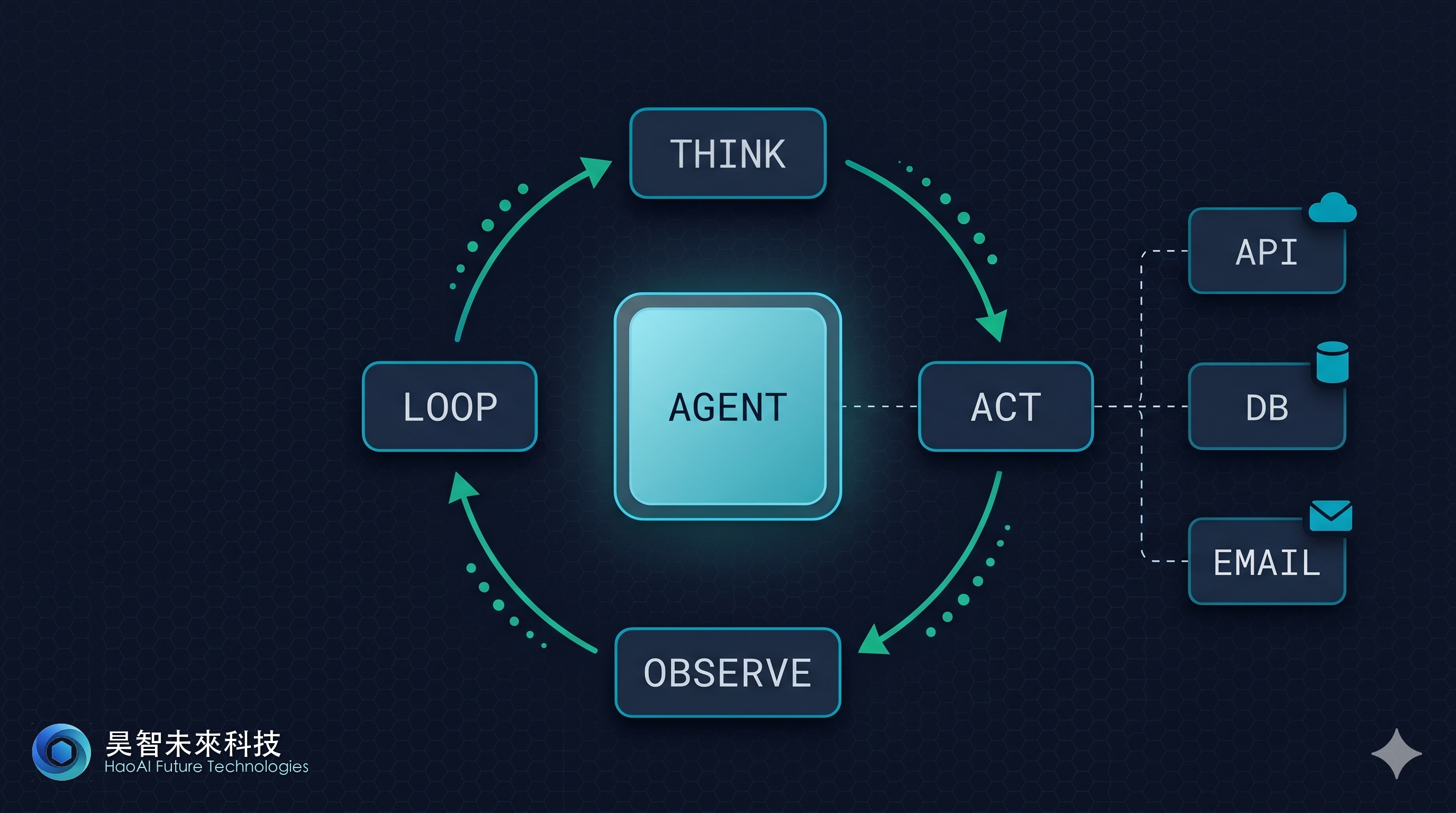
規劃模組的心臟是 ReAct 迴圈——一個自迴歸的思考-行動-觀察流程:
┌─────────────┐
│   思考 (T)   │ —— Agent 分析目標、候選方案、優先順序
├─────────────┤
│   行動 (A)   │ —— Agent 選擇並呼叫工具
├─────────────┤
│   觀察 (O)   │ —— Agent 接收工具結果、評估進度
├─────────────┤
│ 停止?      │ —— 如果達成目標 → 輸出最終結果
│             │    否則 → 回到「思考」繼續迭代
└─────────────┘
每一輪迴圈通常需要 1-10 秒(取決於工具延遲)。一個複雜任務可能需要 3-20 輪迴圈。
實際企業例子
場景:客戶自動開票
用戶問:「我要為客戶 ABC 開一張 NT$50,000 的發票,並自動發送到他們的信箱。」
Agent 的推理過程:
- 思考:需要完成三項子任務:查詢客戶聯絡資訊 → 調用開票系統 → 寄送 Email
- 行動:呼叫
query_customer_by_name("ABC") - 觀察:取得客戶 ID=12345、Email=abc@company.tw、稅籍編號
- 思考:已有必要資訊,繼續開票
- 行動:呼叫
create_invoice(customer_id=12345, amount=50000, due_date="2026-05-30") - 觀察:開票成功,發票編號 INV-20260427-001
- 思考:現在寄送發票
- 行動:呼叫
send_email(to="abc@company.tw", subject="發票 INV-20260427-001", attachment=pdf_bytes) - 觀察:Email 已寄送
- 思考:所有子任務完成,可以報告結果
- 輸出:「發票已開立,編號 INV-20260427-001,已寄送至 abc@company.tw」
整個流程自動完成,耗時 5-10 秒。
常見規劃模式
| 模式 | 說明 | 適用場景 |
|---|---|---|
| ReAct(逐步推理) | 每次思考後立即行動,邊走邊看 | 流程確定、結果快速反饋的場景 |
| Plan-and-Execute | 先完整規劃所有步驟再執行 | 複雜流程、需要全局優化的場景 |
| Hierarchical Planning | 先規劃高層策略,再逐層展開細節 | 超大規模任務(如年度營運計畫) |
支柱二:工具使用(Tool Use / Function Calling)
什麼是工具
工具是 Agent 與外部世界的介面。可以是:
- API 呼叫:GET/POST 請求到企業系統(CRM、ERP、HRM)
- 資料庫查詢:SQL 或 NoSQL 查詢
- 檔案操作:讀寫本機/雲端檔案系統
- 第三方服務:支付 API、簡訊閘道、郵件服務
- 自訂程式碼:執行 Python/JavaScript 片段進行複雜計算
工具定義範例
# 使用 Anthropic Python SDK 定義工具

from anthropic import Anthropic

client = Anthropic()

tools = [
    {
        "name": "query_customer",
        "description": "按名稱或統編查詢客戶資訊(包括聯絡方式、信用額度、歷史交易)",
        "input_schema": {
            "type": "object",
            "properties": {
                "identifier": {
                    "type": "string",
                    "description": "客戶名稱或統一編號"
                }
            },
            "required": ["identifier"]
        }
    },
    {
        "name": "create_invoice",
        "description": "建立新發票,自動計算稅金與運費",
        "input_schema": {
            "type": "object",
            "properties": {
                "customer_id": {"type": "string"},
                "items": {
                    "type": "array",
                    "items": {
                        "type": "object",
                        "properties": {
                            "product_id": {"type": "string"},
                            "quantity": {"type": "number"}
                        }
                    }
                },
                "due_date": {
                    "type": "string",
                    "description": "繳款期限,格式 YYYY-MM-DD"
                }
            },
            "required": ["customer_id", "items"]
        }
    },
    {
        "name": "send_email",
        "description": "發送電子郵件,支援附件",
        "input_schema": {
            "type": "object",
            "properties": {
                "to": {"type": "string"},
                "subject": {"type": "string"},
                "body": {"type": "string"},
                "attachments": {
                    "type": "array",
                    "items": {"type": "string"},
                    "description": "檔案路徑陣列"
                }
            },
            "required": ["to", "subject", "body"]
        }
    }
]

# Agent 執行迴圈
messages = [
    {"role": "user", "content": "幫我為客戶 ABC 開一張 50,000 元的發票並寄出去"}
]

response = client.messages.create(
    model="claude-sonnet-4-6",  # 當前 Claude Sonnet 4.6(速度與智能的最佳平衡)
    max_tokens=4096,
    tools=tools,
    messages=messages
)

# 處理 Agent 的工具呼叫
while response.stop_reason == "tool_use":
    tool_use = next(
        block for block in response.content
        if block.type == "tool_use"
    )

    # 這裡實現工具的實際邏輯
    if tool_use.name == "query_customer":
        result = external_api.query_customer(tool_use.input["identifier"])
    elif tool_use.name == "create_invoice":
        result = external_api.create_invoice(**tool_use.input)
    elif tool_use.name == "send_email":
        result = external_api.send_email(**tool_use.input)

    # 將結果送回 Agent
    messages.append({"role": "assistant", "content": response.content})
    messages.append({
        "role": "user",
        "content": [
            {
                "type": "tool_result",
                "tool_use_id": tool_use.id,
                "content": str(result)
            }
        ]
    })

    response = client.messages.create(
        model="claude-sonnet-4-6",  # 當前 Claude Sonnet 4.6(速度與智能的最佳平衡)
        max_tokens=4096,
        tools=tools,
        messages=messages
    )

# 最終回應
final_response = next(
    (block.text for block in response.content if hasattr(block, "text")),
    None
)
print(final_response)
工具設計原則
- 原子性 — 每個工具做好一件事。不要把「開票+寄信」揉在一起
- 冪等性 — 同樣輸入,重複呼叫應該安全(或至少可診斷重複)
- 快速反饋 — 理想情況下工具應在 1-5 秒內返回結果
- 清晰的失敗訊息 — 工具失敗時應返回可操作的錯誤訊息,而非堆棧追蹤
工具權限與安全
┌─────────────────┐
│    Agent 請求    │  「我想呼叫 'delete_customer'」
├─────────────────┤
│  權限檢查層     │  「你沒有權限刪除客戶,只能查詢與建立」
├─────────────────┤
│  允許的工具列表  │  ✓ query_customer
│                 │  ✓ create_invoice
│                 │  ✗ delete_customer (denied)
├─────────────────┤
│   工具執行      │  執行被允許的工具
└─────────────────┘
支柱三:記憶系統(Memory Systems)
Agentic AI 需要三層記憶架構:
層級 1:短期記憶(Conversation Context)
範圍:當前對話的完整歷史
實作:保留最近 N 輪對話(通常 5-20 輪)
例子:
User: 幫我查一下客戶 ABC 的資訊
Agent: 查到了,客戶 ID=12345,營收 1,000 萬元...
User: 這個客戶接下來應該買什麼?
Agent: 根據他們的產業(製造業)與規模,推薦...
User: 好的,幫我排一個拜訪行程
Agent: 我會根據前面查到的客戶資訊...
短期記憶讓 Agent 能記得「ABC 是製造業、ID=12345」,無需用戶重複說明。
層級 2:長期記憶(Vector Store + Knowledge Graph)
向量資料庫範例:儲存過去的決策、客戶洞察、最佳實踐
# 範例:儲存過去成功的推薦案例
from pinecone import Pinecone

pc = Pinecone(api_key="xxx")
index = pc.Index("customer-insights")

# 執行推薦後,儲存案例
embedding = get_embedding(
    "製造業、年營收 1000 萬、購買過工業軟體 → 推薦 ERP 升級方案"
)
index.upsert([
    ("case_001", embedding, {
        "industry": "manufacturing",
        "revenue_range": "10M-50M",
        "past_purchases": "industrial_software",
        "recommendation": "ERP_upgrade",
        "success_rate": 0.78
    })
])

# 下次推薦時查詢相似案例
query_embedding = get_embedding(
    "製造業、年營收 1500 萬、購買過工業軟體"
)
similar_cases = index.query(vector=query_embedding, top_k=5)
# 返回最相似的 5 個過往成功案例,Agent 參考做決策知識圖譜範例:企業內部事實結構化儲存
客戶節點:台積電 ─ 產業:半導體 ─ 所在地:竹科 ─ 年營收:6 兆
                    ├─ 購買過:先進製程設備
                    ├─ 聯絡人:劉德音(CEO)
                    └─ 上次交互:2026-03-01

產品節點:EDA 軟體 ─ 目標產業:半導體 ─ 預期價格:500 萬/年
                    ├─ 競爭對手:Cadence, Synopsys
                    └─ 客戶滿意度:4.8/5(基於 12 筆評價)
Agent 可以快速查詢:「哪些半導體客戶過去購買過 EDA 軟體?」 → 返回 3 家相似客戶名單。
層級 3:工作記憶(Working Memory)
範圍:當前任務的中間結果與狀態
例子:
Task: 「為製造業客戶群進行年度提案」

Working Memory State:
{
    "task_id": "annual_proposal_2026",
    "target_segment": "manufacturing",
    "customers_identified": [
        {"id": 12345, "name": "ABC 製造", "size": "大型", "status": "processing"},
        {"id": 12346, "name": "DEF 機械", "size": "中型", "status": "pending"}
    ],
    "generated_proposals": 1,
    "failed_proposals": 0,
    "next_step": "generate_proposal_for_customer_12346"
}
當 Agent 處理任務時,持續更新此狀態。若 Agent 崩潰或被中斷,可以從「next_step」恢復,無需從頭開始。
支柱四:編排層(Orchestration Layer)
編排層管理 Agent 的生命週期、資源分配與通訊機制。
單個 Agent 的執行引擎
class Agent:
    def __init__(self, name, system_prompt, tools):
        self.name = name
        self.system_prompt = system_prompt
        self.tools = tools
        self.conversation_history = []
        self.vector_store = None
        self.working_memory = {}

    def execute(self, user_message, max_iterations=10):
        """單一 Agent 的執行迴圈"""
        self.conversation_history.append({
            "role": "user",
            "content": user_message
        })

        for iteration in range(max_iterations):
            # 1. 呼叫 LLM 進行推理
            response = self.call_llm()

            # 2. 檢查是否需要呼叫工具
            if response.stop_reason == "tool_use":
                tool_calls = [b for b in response.content if b.type == "tool_use"]

                # 3. 執行工具(可並行)
                results = self.execute_tools(tool_calls)

                # 4. 將結果反饋給 LLM
                self.conversation_history.append({
                    "role": "assistant",
                    "content": response.content
                })
                self.conversation_history.append({
                    "role": "user",
                    "content": results
                })
            else:
                # Agent 完成,回傳最終答案
                return next((b.text for b in response.content if hasattr(b, "text")), None)

        # 超過最大迭代次數
        raise Exception("Agent 未能在規定迴圈內完成任務")
三、三種 Multi-Agent 協作模式
當單個 Agent 無法勝任複雜任務時,引入多個 Agent 協作。企業中常見三種模式:
模式一:Orchestrator 中央協調模式
架構:一個「主管」Agent 負責任務分解與結果整合,多個「專家」Agent 負責細項工作。
┌──────────────────────────────────────────┐
│        Orchestrator Agent(主管)         │
│  職責:理解用戶需求 → 分配任務 → 整合結果  │
└────┬───────────────┬──────────┬──────────┘
     │               │          │
     ▼               ▼          ▼
┌──────────┐  ┌──────────┐  ┌──────────┐
│CRM 專家  │  │數據分析  │  │市場情報  │
│ Agent    │  │ Agent    │  │ Agent    │
│工具:查詢 │  │工具:分析 │  │工具:搜尋 │
│客戶資料  │  │趨勢      │  │新聞      │
└──────────┘  └──────────┘  └──────────┘
例子:自動業務簡報生成
用戶:「幫我準備拜訪台積電的完整簡報」
- Orchestrator 分解成三項子任務
- 指派 CRM Agent:「查台積電的交易歷史與聯絡人」
- 指派分析 Agent:「分析業界趨勢與競爭對手」
- 指派情報 Agent:「搜尋台積電最近的新聞與動向」
- 等待三個 Agent 回報結果
- Orchestrator 整合成一份完整簡報
優點:
- 高度可控——主管可以檢查每個子任務的結果
- 易於除錯——問題發生在哪個 Agent 清楚可見
- 適合明確分工的場景
缺點:
- 延遲較高——必須等所有 Agent 完成才能整合
- 任務調度需要人工設計——難以應對臨時變化
模式二:Pipeline 流水線模式
架構:Agent 按照預定順序串聯,前一個 Agent 的輸出是後一個 Agent 的輸入。
┌──────────┐    ┌──────────┐    ┌──────────┐
│ 檢索 Agent │──▶│ 分析 Agent │──▶│ 撰寫 Agent │
│          │    │          │    │          │
│搜尋資料   │    │整理重點   │    │生成文案   │
└──────────┘    └──────────┘    └──────────┘
   輸出 ▶          輸出 ▶            輸出 ▶
  原始資料       重點摘要           最終文案
例子:自動市場分析報告生成
-
檢索 Agent:搜尋「AI 在醫療產業的應用」,取得 50+ 篇文章、案例研究、財報數據
- 輸出:結構化的原始資料 (JSON)
-
分析 Agent:接收原始資料,進行去重、歸類、關鍵數據提取
- 輸出:「市場規模 XXX 億、年增率 XX%、主要玩家 ABC」
-
撰寫 Agent:接收分析結果,撰寫為易讀的市場報告
- 輸出:完整的 Markdown 報告
優點:
- 延遲低——每個 Agent 可立即開始處理前一個的輸出
- 易於調整——可輕易增減管道中的 Agent
- 適合明確的資訊流向
缺點:
- 不夠靈活——若前一步驟發現需要額外資訊,後續步驟難以回溯
- 難以並行——只能按順序執行
模式三:Blackboard 共享黑板模式(又稱 Shared State / Event-Driven 模式)
架構:所有 Agent 共享一個中央「黑板」(通常是資料庫或 Vector Store),獨立地讀寫資訊。無預定義的執行順序,Agent 基於黑板狀態自主決策。
           ┌─────────────────────────┐
           │   Shared Blackboard     │
           │  (資料庫 / Vector Store) │
           │  ┌────────────────────┐ │
           │  │ 客戶資料            │ │
           │  │ 市場洞察            │ │
           │  │ 推薦候選            │ │
           │  │ 風險預警            │ │
           │  └────────────────────┘ │
           └────┬────────┬────────┬──┘
                │        │        │
    ┌───────────▼─┐ ┌────▼────────▼──┐ ┌────────────────┐
    │ 數據補充 Agent │ │推薦引擎 Agent  │ │風險監測 Agent  │
    │             │ │              │ │               │
    │讀: 客戶資料  │ │讀: 客戶資料  │ │讀: 推薦候選   │
    │寫: 補充欄位  │ │寫: 推薦候選  │ │寫: 風險預警   │
    └─────────────┘ └──────────────┘ └────────────────┘
例子:即時營運決策系統
-
數據補充 Agent(24/7 運行)
- 每小時檢查黑板
- 若發現新客戶無「產業分類」,自動填充
- 寫回黑板
-
推薦引擎 Agent(基於事件觸發)
- 監聽黑板中新增的客戶
- 計算推薦產品列表
- 寫回黑板的「推薦候選」欄
-
風險監測 Agent(基於規則觸發)
- 若發現某客戶「連續 30 天無交易」
- 標記為「高流失風險」
- 寫入黑板的「風險預警」欄
優點:
- 高度自主——Agent 無需協調,自行決策何時行動
- 擴展性強——增加新 Agent 無需改動現有 Agent
- 易於非同步運行——Agent 可在不同時間執行,無須等待
缺點:
- 難以除錯——資訊流動複雜,問題根因難尋
- 可能衝突——多個 Agent 同時寫同一欄位需要鎖定機制
- 需要清晰的數據契約——黑板的欄位定義必須明確
模式比較表
| 維度 | Orchestrator 中央協調 | Pipeline 流水線 | Blackboard 共享黑板 |
|---|---|---|---|
| 適用場景 | 明確分工、有主次序的任務 | 資訊逐層加工 | 多個自主 Agent、即時系統 |
| 延遲 | 高(需等待所有子任務) | 低(流水線) | 低(非同步) |
| 可控性 | 高(Orchestrator 把關) | 中等(每層獨立) | 低(Agent 自主) |
| 可擴展性 | 中等(添加子 Agent 需編碼) | 高(輕易增減管道) | 高(新 Agent 直接接入) |
| 除錯難度 | 低(資訊流清晰) | 低(順序明確) | 高(資訊流複雜) |
| 最佳實作框架 | LangChain、AutoGen | LangChain Chains | 自訂系統或 Redis Pub/Sub |
四、企業導入 Agentic AI 的五個關鍵設計原則
為確保 Agentic AI 系統在企業環境中安全、可靠、可控地運作,必須遵守以下五個原則:
原則一:可控性(Controllability)—— 人類保持決策權
問題:Agentic AI 能自主執行任務,但不能讓 Agent 為所欲為。
解決方案:實現 Human-in-the-Loop(HITL)檢查點。
class ControllableAgent:
    def __init__(self, approval_threshold="critical"):
        self.approval_threshold = approval_threshold  # "none", "critical", "all"

    def execute_action(self, action):
        """根據設定的門檻進行人工審批"""
        action_risk_level = self.assess_risk(action)

        # 風險分級
        if action_risk_level == "low" and self.approval_threshold == "none":
            # 低風險 + 無需審批:直接執行
            return self.execute(action)

        elif action_risk_level == "medium" and self.approval_threshold == "none":
            # 中等風險 + 無需審批:直接執行(但記錄)
            self.audit_log(action)
            return self.execute(action)

        elif action_risk_level == "critical" or self.approval_threshold == "critical":
            # 高風險或設定為「重要審批」:等待人類確認
            approval_token = self.request_approval(action, timeout=3600)  # 1 小時超時
            if approval_token.approved:
                return self.execute(action)
            else:
                return {"status": "rejected", "reason": approval_token.reason}

        elif self.approval_threshold == "all":
            # 全部審批:所有動作都需確認
            approval_token = self.request_approval(action, timeout=300)
            if approval_token.approved:
                return self.execute(action)
            else:
                return {"status": "rejected"}

    def assess_risk(self, action):
        """評估動作風險等級"""
        if action.type == "delete_customer":
            return "critical"  # 刪除客戶 → 高風險
        elif action.type == "refund_over_10k":
            return "critical"  # 退款超過 10K → 高風險
        elif action.type == "send_email":
            return "low"       # 發信 → 低風險
        elif action.type == "modify_invoice":
            return "medium"    # 修改發票 → 中等風險
        else:
            return "low"

    def request_approval(self, action, timeout=3600):
        """向人類發送審批請求"""
        notification = {
            "type": "approval_request",
            "action": action.describe(),
            "risk_level": self.assess_risk(action),
            "timeout_seconds": timeout,
            "approval_link": f"https://company.com/approvals/{uuid.uuid4()}"
        }
        # 發送至信箱、Slack、內部系統等
        self.send_notification(notification)

        # 等待結果(同步阻塞或非同步 callback)
return self.wait_for_approval(timeout)實踐例子:
| 動作 | 風險等級 | 審批要求 |
|---|---|---|
| 查詢客戶名單 | 低 | 無 |
| 發送市場推廣 Email | 低 | 無 |
| 修改已開立發票 | 中 | 經理級確認 |
| 退款超過 5 萬 | 高 | 部長級確認 |
| 刪除客戶紀錄 | 極高 | 副總級 + 合規確認 |
原則二:可追蹤性(Observability)—— 完整的決策審計
問題:Agent 做了什麼決策、為什麼做、根據什麼資訊?必須能追蹤。
解決方案:實現多層次的決策日誌。
import json
import logging
from datetime import datetime
from enum import Enum

class DecisionLog:
    def __init__(self, db_connection):
        self.db = db_connection
        self.logger = logging.getLogger("agent_audit")

    def log_reasoning_step(self, agent_id, step_number, thought, action, observation):
        """記錄 ReAct 迴圈的每一步"""
        record = {
            "timestamp": datetime.utcnow().isoformat(),
            "agent_id": agent_id,
            "step": step_number,
            "thinking": thought,
            "action_taken": action,
            "observation_result": observation,
            "tokens_used": thought.token_count + action.token_count
        }
        self.db.audit_logs.insert_one(record)
        self.logger.info(f"Agent {agent_id} Step {step_number}: {action.type}")

    def log_tool_call(self, agent_id, tool_name, input_params, output, execution_time_ms):
        """記錄工具呼叫及結果"""
        record = {
            "timestamp": datetime.utcnow().isoformat(),
            "agent_id": agent_id,
            "tool_name": tool_name,
            "input_params": self.sanitize(input_params),  # 移除敏感資訊
            "output_summary": self.summarize(output),
            "execution_time_ms": execution_time_ms,
            "status": "success" if output.error is None else "failure",
            "error_message": output.error if output.error else None
        }
        self.db.tool_calls.insert_one(record)

    def log_decision_rationale(self, agent_id, decision, evidence, confidence_score):
        """記錄決策理由與信心度"""
        record = {
            "timestamp": datetime.utcnow().isoformat(),
            "agent_id": agent_id,
            "decision": decision,
            "supporting_evidence": evidence,  # 引用的資訊來源
            "confidence_score": confidence_score,  # 0.0 - 1.0
            "reversible": decision.is_reversible
        }
        self.db.decisions.insert_one(record)

    def generate_audit_report(self, task_id, format="html"):
        """生成任務的完整審計報告"""
        logs = self.db.audit_logs.find({"task_id": task_id})
        tool_calls = self.db.tool_calls.find({"task_id": task_id})
        decisions = self.db.decisions.find({"task_id": task_id})

        report = {
            "task_id": task_id,
            "total_reasoning_steps": len(logs),
            "tools_used": len(tool_calls),
            "decisions_made": len(decisions),
            "total_tokens": sum(log["tokens_used"] for log in logs),
            "timeline": self.build_timeline(logs, tool_calls, decisions)
        }

        if format == "html":
            return self.render_html_report(report)
        elif format == "json":
            return json.dumps(report)
        else:
            return report

# 使用範例
audit = DecisionLog(mongodb_client)

# Agent 每次思考/行動都記錄
audit.log_reasoning_step(
    agent_id="agent_sales_001",
    step_number=3,
    thought="客戶 ABC 已購買過 3 次 ERP 軟體,應該推薦進階版本或追加模組",
    action={"type": "tool_call", "tool": "recommend_products", "params": {"customer_id": 12345}},
    observation={"products": ["ERP-advanced", "HR-module"], "confidence": 0.92}
)

# 外部系統呼叫也記錄
audit.log_tool_call(
    agent_id="agent_sales_001",
    tool_name="query_customer_history",
    input_params={"customer_id": 12345},
    output={"purchases": [...]},
    execution_time_ms=245
)

# 最後生成稽核報告(供合規部門檢查)
report = audit.generate_audit_report(task_id="task_proposal_2026_03_26", format="html")查詢範例:
用戶:「為什麼系統推薦給客戶 ABC 的是『ERP 進階版』而不是『CRM 解決方案』?」
系統回答:
決策時間:2026-03-26 14:30:45
推薦產品:ERP 進階版
信心度:92%

根據:
1. 客戶購買歷史(確度 100%):過去 12 個月購買 3 次 ERP 相關軟體
2. 產業特徵(確度 88%):製造業,公司規模 500-1000 人
3. 交叉銷售模型(確度 85%):類似規模製造業客戶中 78% 購買 ERP 進階版
4. 市場趨勢(確度 72%):製造業上半年 IT 採購傾向向 ERP 集中

決策流程:
Step 1: 查詢客戶 ABC 過往購買 → 發現 ERP 傾向
Step 2: 檢索類似客戶購買模式 → 發現 ERP 進階版成交率最高
Step 3: 驗證客戶規模是否符合 → 確認符合
Step 4: 最終決策 → 推薦 ERP 進階版,置信度 92%
原則三:錯誤處理(Error Handling)—— 優雅降級與自動恢復
問題:外部系統故障(如 API 超時、資料庫連線中斷),Agent 如何應對?
解決方案:多層次的容錯機制。
from tenacity import retry, stop_after_attempt, wait_exponential
from circuitbreaker import circuit

class ResilientAgent:
    def __init__(self):
        self.circuit_breaker_states = {}  # 追蹤各工具的健康狀態

    @retry(
        stop=stop_after_attempt(3),
        wait=wait_exponential(multiplier=1, min=2, max=10)
    )
    def call_external_api(self, api_name, params):
        """帶有自動重試的 API 呼叫"""
        try:
            response = api_client.call(api_name, params)
            return response
        except TimeoutError:
            # 重試邏輯由 @retry 裝飾器自動處理
            raise
        except Exception as e:
            self.logger.error(f"API {api_name} 失敗:{e}")
            raise

    @circuit(failure_threshold=5, recovery_timeout=60)
    def query_customer_database(self, customer_id):
        """使用熔斷器保護資料庫連線"""
        return db.customers.find_one({"id": customer_id})

    def handle_tool_failure(self, tool_name, error_type, original_params):
        """優雅降級策略"""
        if error_type == "timeout":
            # 對於超時,嘗試使用快取資料
            cached = self.get_cached_result(tool_name, original_params)
            if cached:
                self.log_fallback("used_cache", tool_name)
                return {"status": "degraded", "source": "cache", "data": cached}
            else:
                self.log_fallback("no_cache", tool_name)
                return {"status": "error", "reason": "無法獲取數據,已超時"}

        elif error_type == "circuit_open":
            # 熔斷器開啟(服務故障),使用離線替代方案
            if tool_name == "query_competitor_pricing":
                # 查詢 3 天前的快取價格
                return self.get_stale_data(tool_name, max_age_hours=72)
            else:
                return {"status": "error", "reason": f"{tool_name} 暫時不可用,請稍後重試"}

        elif error_type == "permission_denied":
            # 權限不足,提示使用者而非重試
            return {"status": "error", "reason": "權限不足,無法存取該資源"}

        else:
            # 其他錯誤
            return {"status": "error", "reason": str(error_type)}

    def execute_with_fallback(self, primary_tool, fallback_tools, params):
        """優先嘗試主要工具,失敗則依序嘗試備選工具"""
        tools_to_try = [primary_tool] + fallback_tools
        last_error = None

        for tool in tools_to_try:
            try:
                self.logger.info(f"嘗試工具: {tool}")
                result = self.call_tool(tool, params)

                if result.status == "success":
                    self.logger.info(f"成功使用工具: {tool}")
                    return result
                else:
                    last_error = result

            except Exception as e:
                self.logger.warning(f"工具 {tool} 失敗: {e}")
                last_error = e
                continue

        # 所有工具都失敗
        self.logger.error(f"所有工具均失敗: {last_error}")
        return {"status": "error", "reason": "無可用工具", "details": str(last_error)}

# 使用範例
agent = ResilientAgent()

# 優先使用即時 API,失敗則使用快取,再失敗則使用統計預測
result = agent.execute_with_fallback(
    primary_tool="get_live_competitor_pricing",
    fallback_tools=["get_cached_pricing", "estimate_based_on_history"],
    params={"competitor_id": "competitor_001"}
)降級策略矩陣:
| 工具 | 正常模式 | 降級模式 1 | 降級模式 2 |
|---|---|---|---|
| 即時客戶庫存查詢 | 呼叫 WMS API | 使用 2 小時前的快取 | 報告「數據不可用」 |
| 競爭對手價格情報 | 爬取官網 | 使用 3 天前的快取 | 使用統計預測 |
| 市場新聞搜尋 | Google News API | DuckDuckGo 備用 | 使用本地知識庫 |
原則四:安全邊界(Security Boundaries)—— 最小權限 + 數據分級
問題:Agent 可以呼叫的工具太多太強大,容易造成資訊外洩或非法操作。
解決方案:基於角色的工具存取控制(RBAC for Tools)。
class SecureToolRegistry:
    def __init__(self):
        self.tool_permissions = {
            "sales_agent": {
                "query_customer": {"allowed": True, "fields": ["name", "contact", "purchase_history"]},
                "query_customer.salary": {"allowed": False},  # 銷售員不該看薪水
                "create_invoice": {"allowed": True, "max_amount": 500000},  # 最多開 50 萬發票
                "delete_customer": {"allowed": False},
                "send_email": {"allowed": True, "allowed_domains": ["@company.tw", "@partner.com"]}
            },
            "hr_agent": {
                "query_employee": {"allowed": True, "fields": ["name", "dept", "salary", "performance"]},
                "query_customer": {"allowed": False},  # HR Agent 不該看客戶資料
                "send_email": {"allowed": True, "allowed_domains": ["@company.tw"]}
            },
            "analyst_agent": {
                "query_customer": {"allowed": True, "fields": ["*"]},  # 分析員可看全部
                "generate_report": {"allowed": True},
                "send_email": {"allowed": False}  # 分析員不該直接發信
            }
        }

    def check_permission(self, agent_role, tool_name, params):
        """檢查 Agent 是否有權限呼叫該工具"""
        if agent_role not in self.tool_permissions:
            raise PermissionError(f"未知的 Agent 角色: {agent_role}")

        if tool_name not in self.tool_permissions[agent_role]:
            raise PermissionError(f"Agent {agent_role} 無權使用工具 {tool_name}")

        permission = self.tool_permissions[agent_role][tool_name]

        if not permission.get("allowed", False):
            raise PermissionError(f"Agent {agent_role} 被禁止使用工具 {tool_name}")

        # 檢查參數限制
        if "max_amount" in permission:
            if params.get("amount", 0) > permission["max_amount"]:
                raise PermissionError(
                    f"金額超過限制: {params['amount']} > {permission['max_amount']}"
                )

        if "fields" in permission and permission["fields"] != ["*"]:
            # 限制可查詢的欄位
            params["allowed_fields"] = permission["fields"]

        return True

class SensitiveDataMasker:
    """對敏感資訊進行遮蔽"""

    def mask_result(self, tool_name, result, agent_role):
        """根據 Agent 角色遮蔽結果中的敏感欄位"""
        if tool_name == "query_customer":
            if agent_role == "sales_agent":
                # 銷售員看不到稅籍編號、銀行帳戶
                result.pop("tax_id", None)
                result.pop("bank_account", None)
            elif agent_role == "analyst_agent":
                # 分析員可以看全部
                pass

        elif tool_name == "query_employee":
            if agent_role == "hr_agent":
                # HR 員工看得到薪水,但要遮蔽其他敏感欄位
                result.pop("ssn", None)  # 身分證號
                result.pop("home_address", None)

        return result

# 使用範例
registry = SecureToolRegistry()

# Sales Agent 嘗試查詢客戶
try:
    registry.check_permission(
        agent_role="sales_agent",
        tool_name="query_customer",
        params={"customer_id": 12345}
    )
    result = execute_tool("query_customer", customer_id=12345)
    result = SensitiveDataMasker().mask_result("query_customer", result, "sales_agent")
except PermissionError as e:
    print(f"拒絕: {e}")

# Sales Agent 嘗試刪除客戶 → 被拒絕
try:
    registry.check_permission(
        agent_role="sales_agent",
        tool_name="delete_customer",
        params={"customer_id": 12345}
    )
except PermissionError as e:
    print(f"拒絕: {e}")  # "Agent sales_agent 被禁止使用工具 delete_customer"

# Sales Agent 嘗試開超過額度的發票 → 被拒絕
try:
    registry.check_permission(
        agent_role="sales_agent",
        tool_name="create_invoice",
        params={"amount": 600000}  # 超過 50 萬額度
    )
except PermissionError as e:
    print(f"拒絕: {e}")  # "金額超過限制: 600000 > 500000"
原則五:持續演進(Continuous Evolution)—— 反饋迴圈與 A/B 測試
問題:Agent 部署後,如何基於實際使用情況改進?
解決方案:實現反饋迴圈與實驗框架。
class FeedbackCollector:
    """收集用戶與系統對 Agent 決策的評價"""

    def collect_user_feedback(self, task_id, user_rating, comment=""):
        """用戶評分:Agent 的建議有沒有幫助?"""
        record = {
            "task_id": task_id,
            "feedback_type": "user_rating",
            "rating": user_rating,  # 1-5 stars
            "comment": comment,
            "timestamp": datetime.utcnow().isoformat()
        }
        self.db.feedback.insert_one(record)

    def collect_outcome_feedback(self, task_id, metric_name, actual_value, target_value):
        """結果反饋:Agent 的決策帶來什麼實際效果?"""
        record = {
            "task_id": task_id,
            "feedback_type": "outcome",
            "metric": metric_name,
            "actual": actual_value,
            "target": target_value,
            "success": actual_value >= target_value,
            "timestamp": datetime.utcnow().isoformat()
        }
        self.db.feedback.insert_one(record)

class ABTestFramework:
    """實驗框架:測試不同的 Agent 提示詞、工具組合、決策邏輯"""

    def run_ab_test(self, variant_a, variant_b, sample_size=1000, duration_days=7):
        """
        A/B 測試兩個 Agent 變體

        variant_a: {"prompt": "...", "tools": [...], "name": "current"}
        variant_b: {"prompt": "...", "tools": [...], "name": "experimental"}
        """
        test_config = {
            "test_id": uuid.uuid4(),
            "variant_a": variant_a,
            "variant_b": variant_b,
            "sample_size": sample_size,
            "duration_days": duration_days,
            "start_time": datetime.utcnow(),
            "status": "running"
        }

        self.db.ab_tests.insert_one(test_config)

        return {
            "test_id": test_config["test_id"],
            "routing_rule": f"if random() < 0.5 then variant_a else variant_b"
        }

    def analyze_ab_test_results(self, test_id):
        """分析 A/B 測試結果"""
        test = self.db.ab_tests.find_one({"test_id": test_id})

        variant_a_feedback = list(self.db.feedback.find({
            "test_id": test_id,
            "variant": "a"
        }))

        variant_b_feedback = list(self.db.feedback.find({
            "test_id": test_id,
            "variant": "b"
        }))

        result = {
            "test_id": test_id,
            "variant_a": {
                "name": test["variant_a"]["name"],
                "avg_rating": sum(f["rating"] for f in variant_a_feedback) / len(variant_a_feedback),
                "success_rate": sum(1 for f in variant_a_feedback if f.get("success")) / len(variant_a_feedback),
                "sample_size": len(variant_a_feedback)
            },
            "variant_b": {
                "name": test["variant_b"]["name"],
                "avg_rating": sum(f["rating"] for f in variant_b_feedback) / len(variant_b_feedback),
                "success_rate": sum(1 for f in variant_b_feedback if f.get("success")) / len(variant_b_feedback),
                "sample_size": len(variant_b_feedback)
            }
        }

        # 統計顯著性檢驗
        from scipy.stats import ttest_ind

        ratings_a = [f["rating"] for f in variant_a_feedback]
        ratings_b = [f["rating"] for f in variant_b_feedback]

        t_stat, p_value = ttest_ind(ratings_a, ratings_b)
        result["statistical_significance"] = {
            "t_statistic": t_stat,
            "p_value": p_value,
            "is_significant_at_005": p_value < 0.05
        }

        # 建議
        if result["variant_b"]["avg_rating"] > result["variant_a"]["avg_rating"] and p_value < 0.05:
            result["recommendation"] = "採用 Variant B(有統計顯著差異)"
        else:
            result["recommendation"] = "保持 Variant A(無明顯改進或不具統計顯著性)"

        return result

# 使用範例
feedback = FeedbackCollector()
ab_test = ABTestFramework()

# 1. 部署新版提示詞做 A/B 測試
test_id = ab_test.run_ab_test(
    variant_a={
        "name": "current",
        "prompt": "你是銷售推薦 Agent。推薦產品時應考量客戶規模、產業、過往購買..."
    },
    variant_b={
        "name": "experimental",
        "prompt": "你是銷售推薦 Agent。在推薦前,先詢問客戶的痛點,再基於痛點推薦..."
    },
    sample_size=500,
    duration_days=14
)

# 2. 收集用戶反饋
for task in completed_tasks:
    feedback.collect_user_feedback(
        task_id=task["id"],
        user_rating=user_input["rating"],  # 1-5
        comment=user_input["comment"]
    )

# 3. 等待 14 天,分析結果
results = ab_test.analyze_ab_test_results(test_id)
print(f"""
Variant A: 平均評分 {results['variant_a']['avg_rating']:.2f}
Variant B: 平均評分 {results['variant_b']['avg_rating']:.2f}
P-value: {results['statistical_significance']['p_value']:.4f}
建議: {results['recommendation']}
""")
五、Agentic AI vs RPA vs 傳統 Chatbot:技術比較
| 維度 | RPA(Robotic Process Automation) | 傳統 Chatbot(ChatGPT) | Agentic AI |
|---|---|---|---|
| 自主決策能力 | 否(只能執行預定流程) | 否(只能建議) | 是(可自主規劃執行) |
| 處理非結構化資訊 | 困難(需規則定義) | 優秀(自然語言理解) | 優秀(理解+行動) |
| 跨系統協作 | 可以,但需硬編碼整合 | 需額外整合,非原生能力 | 動態呼叫 API/工具 |
| 自我優化能力 | 無(規則需人工調整) | 有限(單次對話無延續) | 有(多輪推理+反饋迴圈) |
| 錯誤恢復能力 | 弱(失敗即停止) | 無法自動恢復 | 強(自動重試+優雅降級) |
| 適用場景複雜度 | 低-中(高度重複化) | 低-中(知識問答) | 中-高(複雜跨系統流程) |
| 導入成本 | 高(需深度定製) | 低(API 即開即用) | 中(需設計 Agent 架構) |
| 導入時間 | 2-6 個月 | 1-2 週 | 2-8 週 |
| 維護成本 | 中高(規則易變) | 低(無需維護) | 中(監控反饋迴圈) |
| 可擴展性 | 低(單點故障) | 高(模型升級自動改進) | 高(新工具容易接入) |
| 實際應用案例 | 保險理賠流程、招聘初篩 | 客服常見問題、內容生成 | 訂單-發票-寄送全流程自動化 |
六、從哪裡開始?務實的企業導入建議
第一步:識別高 ROI 候選場景
不是所有流程都適合用 Agentic AI。選擇場景時,考量以下三個因素:
ROI 得分 = (人月成本節省 + 時間價值) / 導入成本
最佳的優先順序 = ROI 得分高 + 失敗容忍度高 + 數據品質好
高優先度場景(立刻著手):
| 場景 | 人月成本節省 | 導入難度 | 風險 | 優先度 |
|---|---|---|---|---|
| 銷售流程自動化(客戶查詢 → 提案生成 → 發送) | 高(每位業務每日節省數十分鐘) | 中 | 低 | 最高 |
| 人資初篩(履歷解析 → 職缺匹配 → 邀約信生成) | 高(篩選時間可縮短 80%+) | 低 | 低 | 最高 |
| 重複性行政任務(數據整合、報表生成、郵件分類) | 中高(減少人工重複操作) | 低 | 低 | 高 |
中優先度場景(試點驗證):
| 場景 | ROI | 難度 | 風險 |
|---|---|---|---|
| 客服工單自動分類與初步回應 | 中等 | 中 | 中(涉及客戶體驗) |
| 市場競爭情報蒐集與分析 | 中等 | 中 | 低 |
| 財務數據異常檢測與預警 | 中等 | 中-高 | 中(涉及合規) |
低優先度場景(暫不考慮):
- 需要極度精準度的場景(如醫療診斷)
- 高度創意性的場景(如品牌策略制定)
- 涉及機密商業決策的場景(如併購分析)
第二步:建立最小可行 Agent(Minimum Viable Agent)
不要一開始就追求完美。先做一個「最小化但完全可用」的 Agent,快速驗證假設。
# MVP Agent 框架(簡化版)

class MinimumViableAgent:
    def __init__(self):
        self.client = Anthropic()
        self.model = "claude-haiku-4-5-20251001"  # 快速、便宜
        self.tools = [
            "query_database",
            "send_email",
            "create_document"
        ]
        self.max_iterations = 5

    def run(self, user_request):
        """最小化 Agent 執行邏輯"""
        messages = [{"role": "user", "content": user_request}]

        for iteration in range(self.max_iterations):
            response = self.client.messages.create(
                model=self.model,
                max_tokens=1024,
                tools=self.get_tool_definitions(),
                messages=messages
            )

            if response.stop_reason == "end_turn":
                # Agent 完成,回傳結果
                return next(
                    (b.text for b in response.content if hasattr(b, "text")),
                    None
                )

            elif response.stop_reason == "tool_use":
                # 執行工具
                tool_use = next(b for b in response.content if b.type == "tool_use")
                result = self.execute_tool(tool_use.name, tool_use.input)

                messages.append({"role": "assistant", "content": response.content})
                messages.append({
                    "role": "user",
                    "content": [
                        {
                            "type": "tool_result",
                            "tool_use_id": tool_use.id,
                            "content": json.dumps(result)
                        }
                    ]
                })

        return "Agent 無法在規定迴圈內完成任務"

# 第一週:驗證假設
agent = MinimumViableAgent()
result = agent.run("幫我為客戶 ABC 準備拜訪資料")
print(result)

# 收集反饋
user_rating = input("這個結果有幫助嗎?(1-5)")
time_saved = float(input("省了多少分鐘?"))
第三步:逐步擴展
一旦 MVP 驗證成功(如得到 4+ 評分、省時超過預期),逐步增加複雜度:
第一階段(2-4 週): 單 Agent + 5-10 個核心工具
第二階段(4-8 週): 添加記憶系統、改進提示詞、實施監控
第三階段(8-12 週): 多 Agent 協作、完整的 HITL 審批、A/B 測試框架
第四階段(3-6 個月): 企業級特性(高可用、容災、合規審計)
第四步:定義成功指標
在開始之前就定義,而不是事後想:
| KPI | 目標值 | 測量方式 |
|---|---|---|
| 人工時間節省 | 依場景設定(如年省 X 小時) | 追蹤每項任務的人工時間前後比 |
| 任務完成率 | ≥ 95% | 成功完成 / 總嘗試次數 |
| 用戶滿意度 | ≥ 4.0 / 5.0 | 每週收集反饋評分 |
| 系統可用性 | ≥ 99.5% | 監控 uptime |
| 成本控制 | AI 成本 ≤ 月度預算 20% | 追蹤 API 成本 |
| ROI 達成期 | ≤ 6 個月 | 成本節省 / 導入投資 |
結語
Agentic AI 從實驗室概念進階到企業生產應用,只花了三年時間。當 LLM 的推理能力超越了人類單輪思考、當成本降到足以支撐日常業務、當工具框架足夠成熟讓非研究人員也能部署時,Agentic AI 的企業應用已成為必然而非選項。
關鍵的 take-away:
- Agentic AI = ReAct + Tool Use + Memory + Orchestration——四大支柱缺一不可
- 可控性、可追蹤性、錯誤處理、安全邊界、持續演進——五大原則保障企業級可靠性
- 從小場景開始,快速驗證,逐步擴展——務實的導入路徑遠優於大規模「all-in」
- 定義 KPI 後再開始——數據驅動決策,而非感覺
對於企業技術決策者而言,現在不是「要不要做 Agentic AI」,而是「從哪個流程開始、怎樣最快看到 ROI」。競爭對手已經在跑了。
關於作者
崔殷豪(Ethan Tsui)— 20+ 年企業技術架構經驗,曾任上市集團副總暨數據長,領導 90+ 人技術團隊。累計 13 項專利、NAR/MCP 國際期刊發表。目前專注於 Agentic AI 企業落地與 Multi-Agent 系統工程。本文基於其在大規模分散式系統與 AI 工程的實踐洞察。